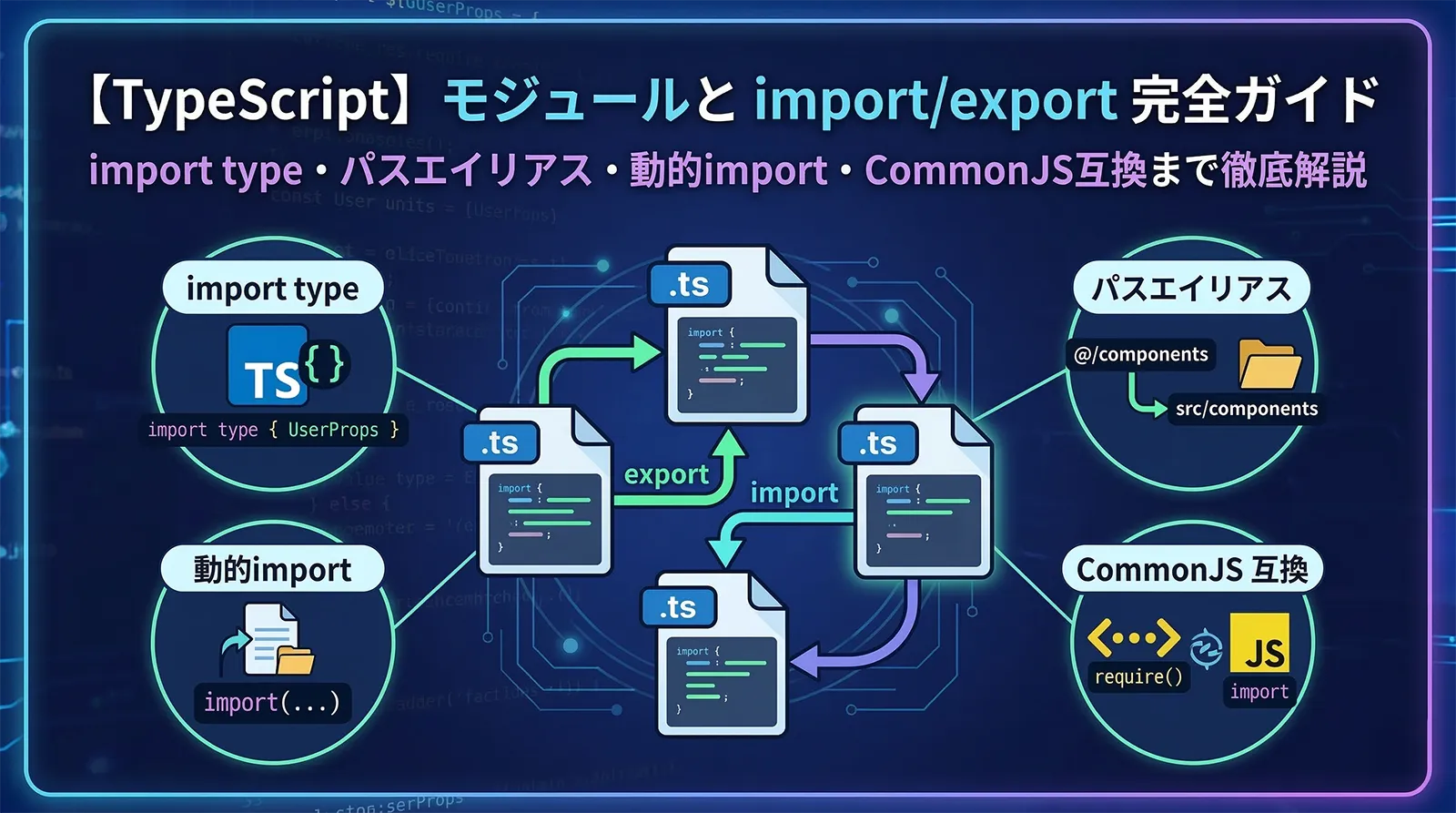
TypeScriptのモジュールシステムは、コードを複数のファイルに分割し再利用するための基盤です。import/export の基本構文から、TypeScript固有の import type、パスエイリアス設定、動的インポート、CommonJSとの互換性まで、知っておくべき知識が多岐にわたります。
本記事では実務で必須のモジュール知識をすべて実例付きで解説します。
モジュールとは
TypeScript(およびJavaScript)では、import または export 文を含むファイルをモジュールと呼びます。モジュールは独自のスコープを持ち、明示的にエクスポートしない限り外部からアクセスできません。
import/export のないファイルはスクリプト扱いになり、変数がグローバルスコープに漏れることがあります。意図的にモジュール化する場合は export {} を末尾に追加するだけで十分です。// モジュールとして扱う(何もエクスポートしない場合でも)
const privateVar = "外部からアクセス不可";
export {}; // これがあるだけでモジュールスコープになる
named export / import
named export(名前付きエクスポート)は最もよく使うエクスポート方式です。1つのファイルから複数の値・型をエクスポートできます。
// math.ts
export const PI = 3.14159;

export function add(a: number, b: number): number {
  return a + b;
}

export interface Point {
  x: number;
  y: number;
}

// まとめてエクスポートする書き方
const multiply = (a: number, b: number) => a * b;
type Matrix = number[][];
export { multiply, Matrix };
// 利用側
import { PI, add, Point } from "./math";

// 別名でインポート
import { add as sum, multiply as mul } from "./math";

// すべてをまとめてインポート(名前空間インポート)
import * as Math from "./math";
console.log(Math.PI);       // 3.14159
console.log(Math.add(1, 2)); // 3
default export / import
default export(デフォルトエクスポート)は1ファイルにつき1つのみ設定できます。Reactコンポーネントでよく使われますが、ライブラリ開発では named export が推奨されます。
// UserCard.tsx
interface Props { name: string; age: number }

export default function UserCard({ name, age }: Props) {
  return <div>{name}({age}歳)</div>;
}

// または
const UserCard = ({ name, age }: Props) => (
  <div>{name}({age}歳)</div>
);
export default UserCard;
// インポート側: 好きな名前でインポートできる
import UserCard from "./UserCard";
import Card from "./UserCard";    // 同じもの(別名可)

// named と default を同時にインポート
import React, { useState, useEffect } from "react";
//     ↑ default    ↑ named exports
import type / export type
TypeScript 3.8で追加された import type は型のみをインポートします。コンパイル後のJavaScriptには出力されず、バンドルサイズの削減と循環参照の回避に役立ちます。
// types.ts
export interface User { id: number; name: string }
export type UserId = number;
export const DEFAULT_USER: User = { id: 0, name: "guest" }; // 値
// service.ts

// import type: 型のみ(JSに出力されない)
import type { User, UserId } from "./types";

// 通常の import: 値も含む
import { DEFAULT_USER } from "./types";

// インライン import type(混在して書ける)
import { type User as UserType, DEFAULT_USER } from "./types";

function getUser(id: UserId): User {
  return { ...DEFAULT_USER, id };
}
// export type: 型のみをエクスポート
export type { User, UserId };

// または個別に
export type UserList = User[];
① 型定義ファイル(.d.ts)から型だけ使う場合 ② 循環参照を型レベルだけに限定したい場合 ③
verbatimModuleSyntax: true を tsconfig で有効化している場合(型のみのimportに import type が強制される)re-export パターン
他のモジュールからインポートして即エクスポートする re-export(再エクスポート)は、APIの窓口を一か所にまとめるときに使います。
// 個別ファイル
// user.ts
export interface User { id: number; name: string }
export function createUser(name: string): User { return { id: Date.now(), name }; }

// product.ts
export interface Product { id: number; price: number }

// models/index.ts で re-export
export { User, createUser } from "./user";
export type { Product } from "./product";   // 型のみの再エクスポート

// 別名を付けて再エクスポート
export { createUser as makeUser } from "./user";

// 全部再エクスポート
export * from "./user";
export * from "./product";

// 利用側: models/index.ts から一括インポート
import { User, Product, createUser } from "./models";
バレルファイル(index.ts)
バレルファイルは index.ts という名前の re-export ファイルで、ディレクトリのエントリポイントとして機能します。インポートパスが短くなり、内部実装の変更が利用側に影響しにくくなります。
src/
├── components/
│   ├── Button.tsx
│   ├── Input.tsx
│   ├── Modal.tsx
│   └── index.ts      ← バレルファイル
├── hooks/
│   ├── useAuth.ts
│   ├── useFetch.ts
│   └── index.ts      ← バレルファイル
└── utils/
    ├── format.ts
    ├── validate.ts
    └── index.ts      ← バレルファイル
// components/index.ts
export { default as Button } from "./Button";
export { default as Input }  from "./Input";
export { default as Modal }  from "./Modal";

// 利用側: バレルがないと...
import Button from "../../components/Button";
import Input  from "../../components/Input";
import Modal  from "../../components/Modal";

// バレルがあると:
import { Button, Input, Modal } from "../../components";
大規模プロジェクトでは
export * を多用するとバンドラーの tree-shaking が効きにくくなる場合があります。Vite・webpack 等の最新バンドラーは多くの場合対応済みですが、パフォーマンスが気になる場合は直接インポートとの使い分けを検討してください。動的インポート(import())
動的インポートは import() 関数を使って実行時にモジュールを読み込む機能です。コード分割(code splitting)や遅延読み込みに使われます。
// 静的インポート: ファイル読み込み時に評価
import { heavyLib } from "./heavy-lib";

// 動的インポート: 必要になったときに評価(Promise を返す)
async function loadHeavyLib() {
  const { heavyLib } = await import("./heavy-lib");
  return heavyLib.process();
}
// React の遅延読み込みと組み合わせ
import React, { lazy, Suspense } from "react";

// 初回レンダリング時に読み込まれる代わりに、
// コンポーネントが必要になったときに動的インポート
const HeavyChart = lazy(() => import("./HeavyChart"));

function Dashboard() {
  return (
    <Suspense fallback={<div>Loading...</div>}>
      <HeavyChart />
    </Suspense>
  );
}
// 条件付き動的インポート
async function loadLocale(lang: string) {
  // lang に応じて異なるファイルを読み込む
  const messages = await import(`./locales/${lang}.json`);
  return messages.default;
}

// 動的インポートの型取得
type HeavyLibModule = typeof import("./heavy-lib");

async function getLib(): Promise<HeavyLibModule> {
  return import("./heavy-lib");
}
パスエイリアス(tsconfig paths)
深いネストのファイルに ../../.. という相対パスでアクセスするのは読みづらく、ファイル移動時のメンテナンスも大変です。tsconfig.json の paths と baseUrl でパスエイリアスを設定できます。
// tsconfig.json
{
  "compilerOptions": {
    "baseUrl": ".",           // プロジェクトルートを基準に
    "paths": {
      "@/*":         ["src/*"],           // src/ を @ でアクセス
      "@components/*": ["src/components/*"],
      "@hooks/*":    ["src/hooks/*"],
      "@utils/*":    ["src/utils/*"],
      "@types/*":    ["src/types/*"]
    }
  }
}
// Before: 深い相対パス
import { Button } from "../../../components/ui/Button";
import { useAuth } from "../../hooks/useAuth";
import { formatDate } from "../../../../utils/date";

// After: パスエイリアス
import { Button }    from "@components/ui/Button";
import { useAuth }   from "@hooks/useAuth";
import { formatDate } from "@utils/date";
TypeScriptコンパイラはパスエイリアスを型チェックに使いますが、コンパイル後のJavaScriptのパス解決はバンドラー(Vite・webpack)が担当します。
• Vite:
vite.config.ts の resolve.alias• webpack:
webpack.config.js の resolve.alias• Jest:
jest.config.ts の moduleNameMapperと それぞれ別途設定が必要です。
// vite.config.ts
import { defineConfig } from "vite";
import { resolve } from "path";

export default defineConfig({
  resolve: {
    alias: {
      "@": resolve(__dirname, "./src"),
      "@components": resolve(__dirname, "./src/components"),
    },
  },
});
CommonJS との互換性
Node.jsの多くのライブラリは CommonJS(require/module.exports)形式です。TypeScriptでは esModuleInterop の設定で互換性を保てます。
// tsconfig.json
{
  "compilerOptions": {
    "module": "commonjs",      // Node.js 向け
    "esModuleInterop": true,   // CJS との互換性を有効化
    "allowSyntheticDefaultImports": true
  }
}
// esModuleInterop なし: エラーになる場合がある
import fs from "fs";             // エラー
import * as fs from "fs";        // OK だが冗長

// esModuleInterop あり: どちらも OK
import fs from "fs";             // OK
import { readFile } from "fs";   // OK(named import)

// require 互換の書き方(TypeScriptでは非推奨)
const path = require("path");    // 型が any になる

// 推奨: import 構文を使う
import path from "path";
import { join, dirname } from "path";
モジュール解決の設定(moduleResolution)
moduleResolution はTypeScriptがimportパスをどう解決するかを制御します。環境に合わせた設定が必要です。
// 現代のフロントエンド(Vite 等)
{
  "compilerOptions": {
    "module": "ESNext",
    "moduleResolution": "bundler",
    "target": "ES2020"
  }
}

// Node.js(ESM 対応)
{
  "compilerOptions": {
    "module": "Node16",
    "moduleResolution": "node16"
  }
}
tsconfig の設定全般については tsconfig.json 完全ガイド も参照してください。
よくあるエラー
// node16 では拡張子が必要
import { foo } from "./utils";    // エラー
import { foo } from "./utils.js"; // OK(.ts ファイルでも .js を指定)

// default export の間違ったインポート
import { MyComponent } from "./MyComponent"; // エラー(named import)
import MyComponent from "./MyComponent";     // OK(default import)
まとめ
関連記事:
FAQ
Qnamed export と default export はどちらを使うべきですか?
A基本的に named export を推奨します。エディタの自動インポート補完の精度が高く、リネームしても import 側のエラーが検出しやすいためです。Reactコンポーネントは慣習的に default export を使いますが、どちらでも問題ありません。
Qimport type を使うメリットは何ですか?
A① コンパイル後のJSに不要なコードが含まれない(バンドルサイズ削減) ② 循環参照を型レベルに限定できる ③ verbatimModuleSyntax を有効にしている場合はコンパイルエラーを防げます。可能な限り使うと良い習慣ですが、特に強制はされません。
Qパスエイリアスを設定したのにインポートエラーになります
ATypeScriptの paths 設定は型チェック用です。ランタイムのモジュール解決はバンドラー(Vite/webpack)や実行環境(Node.js)が行うため、それぞれのエイリアス設定(vite.config.ts の resolve.alias 等)も必要です。
Qバレルファイル(index.ts)はすべてのディレクトリに作るべきですか?
A必須ではありません。外部に公開する API(コンポーネントライブラリ・共通ユーティリティ)には有効ですが、小規模プロジェクトや内部実装ファイルには不要です。大規模プロジェクトではビルド速度への影響も考慮してください。
QESM と CommonJS が混在するとどうなりますか?
AesModuleInterop: true を設定することで多くの場合問題なく使えます。ただし Node.js の ESM モード(.mjs や type: "module")ではCJS モジュールの import に制限があります。Node.js + ESM 環境では moduleResolution: "node16" を使ってください。